Kinect v2 keeps disconnecting on Windows 11
Caused by Windows audio enhancements on the Kinect microphone array. The fix takes two minutes and needs no reboot, no driver reinstall and no new hardware.
The sensor streams for a few seconds, drops out, gets re-detected, and starts over. The disconnect and reconnect loop keeps going for as long as you stream, and it happens in every application: the Brekel apps, Kinect Studio and Microsoft's own SDK samples alike. That last part is the giveaway. It is not an application problem, it is a Windows setting.
The fix
-
Open Windows Settings and go to System > Sound. Scroll to the bottom, to Advanced, and click More sound settings.
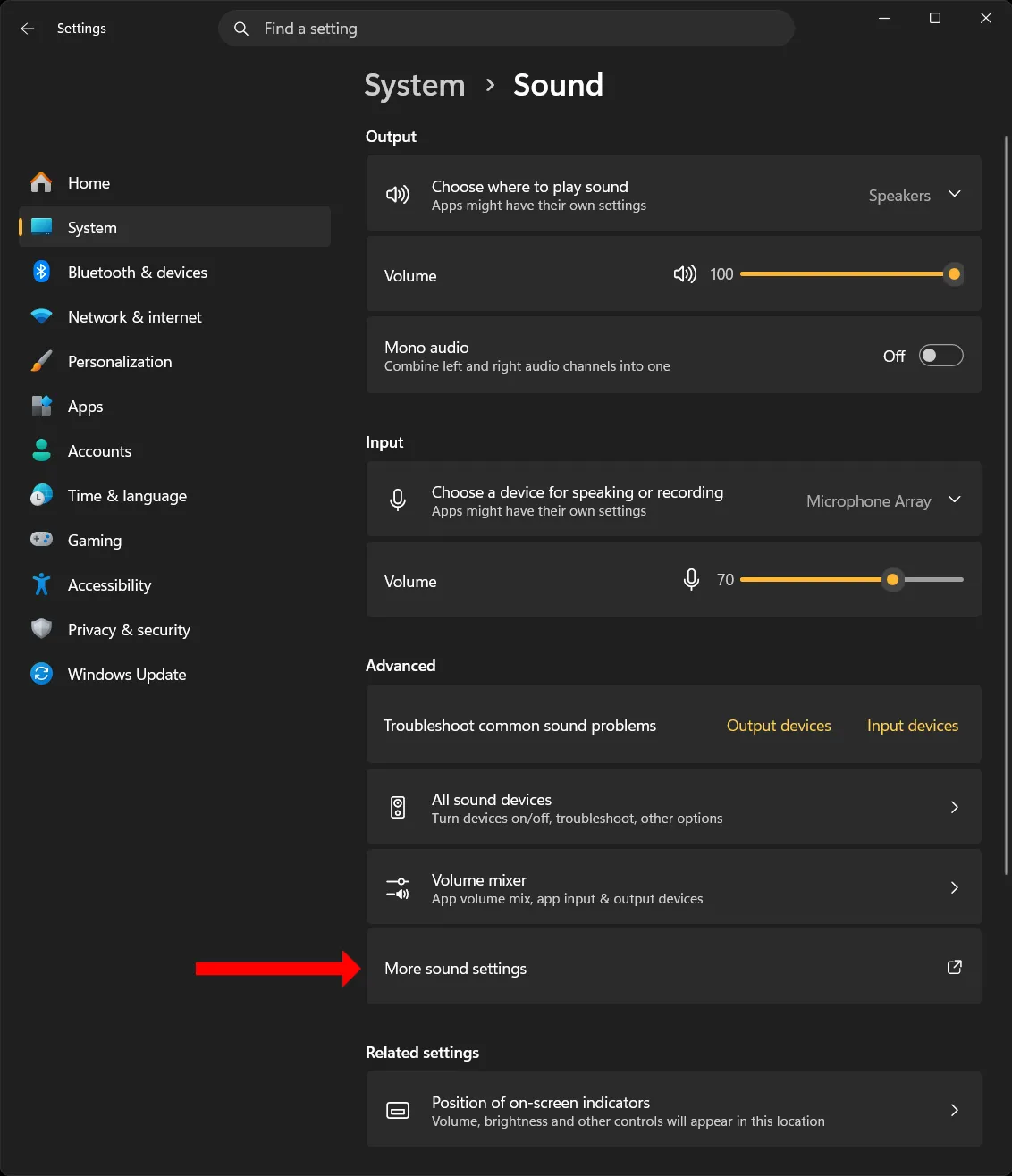
Settings > System > Sound, at the bottom under Advanced -
In the panel that opens, select the Recording tab.
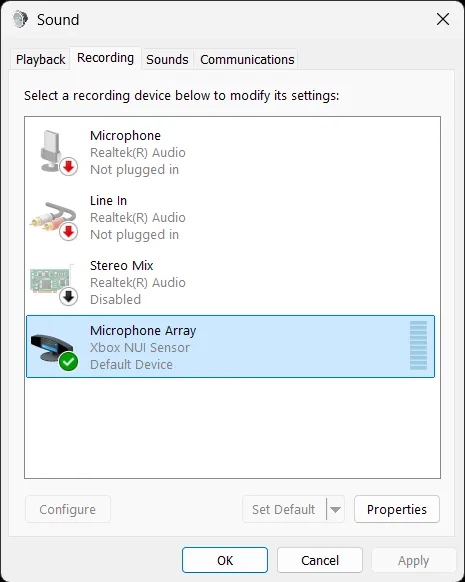
The Recording tab of the classic Sound panel -
Right-click Microphone Array - Xbox NUI Sensor and choose Properties.
-
On the Advanced tab, untick Enable audio enhancements under Signal Enhancements, and click OK.
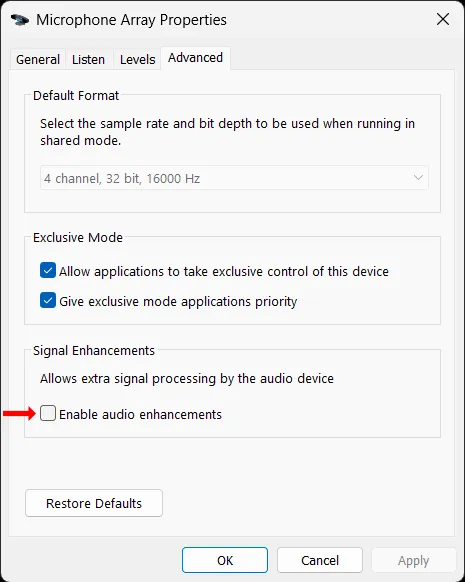
Microphone Array Properties, Advanced tab, Signal Enhancements -
Repeat for every Kinect entry in the Recording tab, not only the active one.
The change takes effect immediately. Confirmed on Windows 11 25H2 (build 26200).
What does not fix it
If you already worked through these, you were not doing anything wrong. None of them touch the cause.
- Swapping the sensor, the power adapter or the USB cable
- A different USB 3.0 port, or an add-in USB controller card
- Reinstalling the Kinect for Windows SDK or the sensor driver
- Microphone privacy settings under Privacy & security
- Disabling USB selective suspend or USB power management
- Disabling the Kinect microphone in Device Manager. The setting lives on the audio endpoint in the Windows audio system, not on the USB device; they are separate objects and only the endpoint one matters.
If the disconnect loop comes back
Windows updates can re-apply audio enhancements to a device. If the loop returns after an update, check the Recording tab again before you check anything else. It is far more likely to be this setting than anything that changed on your machine.
More detail
Kinect v2 disconnects every few seconds: what it looks like
The sensor is fine while it sits idle. It only starts dropping once an application reads depth or colour from it. From there it runs two or three seconds, drops, and Windows re-detects it, repeating roughly every ten to fifteen seconds for as long as you keep streaming.
Two details worth checking, because they confirm you are looking at this problem and not another one:
- In Device Manager, WDF KinectSensor Interface 0 disappears and reappears on every drop.
- There is no USB connect or disconnect chime, because the sensor's internal hub stays connected the whole time. Only the sensor behind it drops.
Why an audio setting turns the cameras off and on
The Kinect v2 is a single composite USB device: depth camera, colour camera and microphone array all share one connection. Windows 11 runs its own processing on microphone inputs, Voice Clarity among it, and that processing is what the Enable audio enhancements checkbox in step 4 switches off.
On this device it is enough to take the whole thing off the USB bus. Windows re-enumerates it, your application reconnects, and the loop starts again. The cameras go down with the microphone because the cameras and the microphone are the same device.
Microsoft documents neither the interaction nor the fix, so that is an explanation of what is observed rather than something you will find in a spec. What is certain is the behaviour: untick the box and the drops stop.
How to check the fix worked
Start a capture and let it run for two minutes. Before the fix you get a drop every ten to fifteen seconds, so two minutes is roughly ten of them. Afterwards the sensor should stay connected for as long as you care to leave it.
Which apps does this affect?
All of them. It is a Windows setting, so it affects everything that reads a Kinect v2, including Kinect Studio and Microsoft's own SDK samples, and fixing it once fixes the lot.
On this site that means Brekel Body v2, Face v2 and PointCloud v2, plus Body v3 and PointCloud v3 when a Kinect v2 is one of the sensors in use.
Still stuck, or hitting something this page does not cover? Ask on Discord or get in touch.